Recherche / Search
Static archiving of a Jira instance
Migration of a legacy Jira 3.13 instance to a static, browsable, searchable HTML archive protected by Microsoft Entra ID SSO.
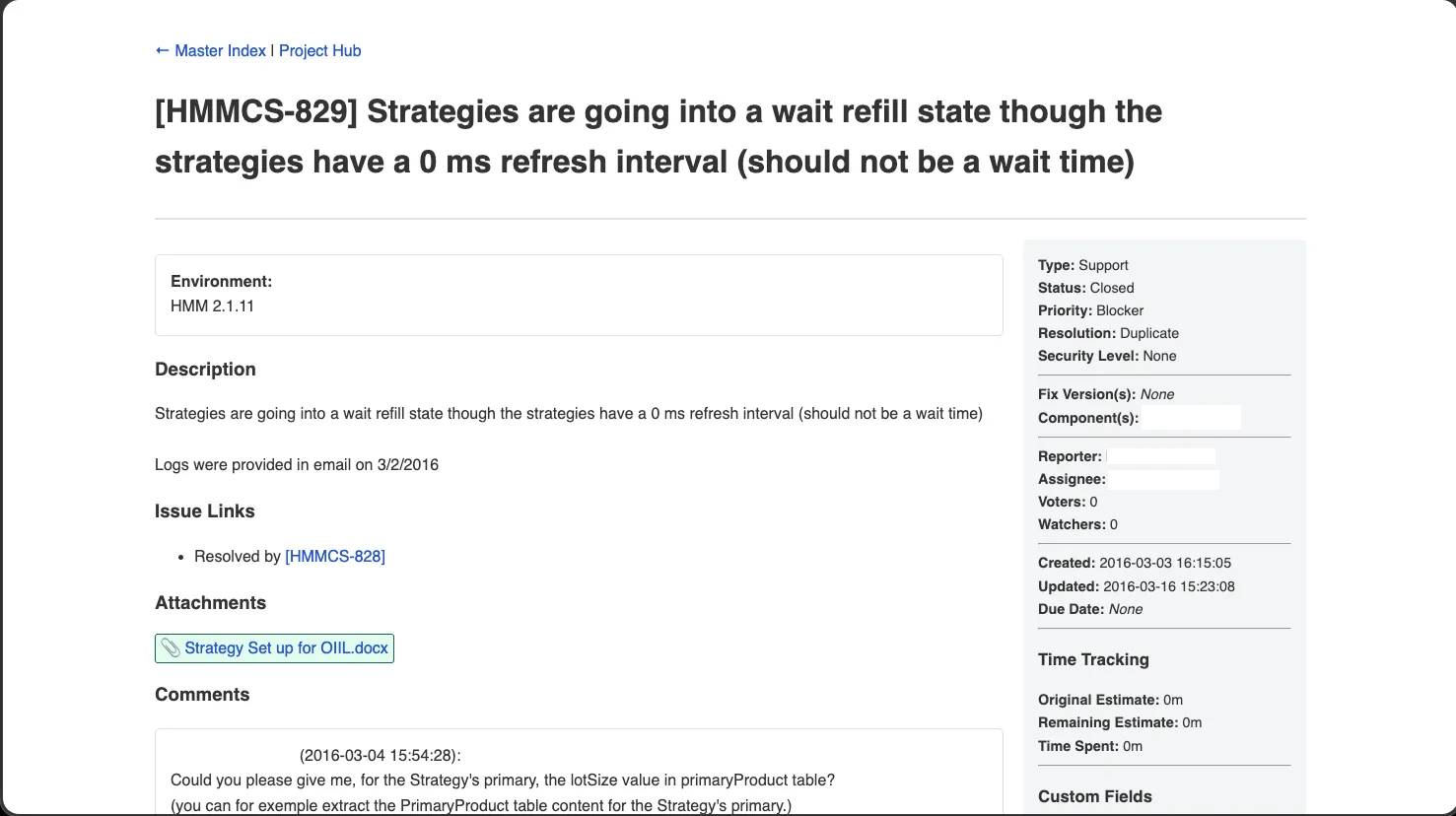
Detailed report
1. Company and project context
1.1 The organisation: Horizon Trading Solutions
Horizon Trading Solutions is a software vendor specialising in professional trading software for financial institutions. Before the migration to Jira Cloud, the company’s history (tickets, development work, incidents, release notes) was managed in a self-hosted Jira 3.13 instance running on an on-premise server. This ageing instance contains several tens of thousands of tickets spread across multiple projects, along with thousands of attachments (images, PDFs, archives, Excel exports, etc.).
1.2 The need
Keeping this instance operational represented a growing cost and risk:
- Operating cost: Java 8, legacy MySQL database, Tomcat application server, backups, monitoring.
- Security risk: Jira version 3.13 released in 2008, no further security updates, outdated JVM.
- Low engagement: only a handful of people still consulted the history, mainly to retrieve context from old tickets.
The goal set by my company tutor was therefore to preserve the entire history in read-only mode, without ever having to run the Jira server itself again:
We want to retain access to the ticket and attachment history for engineers who need it, but we no longer want to run Jira Server. A static, indexed and secured HTML archive is enough.
1.3 Existing situation and provided resources
| Resource | Details |
|---|---|
| Jira XML export | Full export produced by Jira (Administration → System → Backup). Several hundred MB. |
attachments/ folder | Raw attachment hierarchy (<project>/<ticket-key>/<id> or <id>_<filename>) totalling several GB. |
| No existing code | The project was bootstrapped from scratch. |
| Infrastructure and resources | ESXi hypervisor, allowing VM creation. |
| Internal network | Private network mycompany.lan |
| Directory | Microsoft Entra ID |
1.4 Expected outcome
- Static archive: an HTML/CSS/images/attachments folder browsable from any web server without any application backend.
- Full-text search: so that an engineer can locate a ticket by keywords (summary, description, comments, source code in comments, etc.).
- Authentication: no internal document should be accessible without corporate authentication (SSO).
- Group-based authorisation: only members of defined Entra ID groups (the former Jira users) can access it.
- HTTPS + certificate from the company’s internal authority.
- Preserved URLs: legacy deep links (
/jira/browse/PROJ-123,ViewIssue.jspa?key=...,ReleaseNote.jspa?...) must continue to work so as not to break references scattered throughout internal documentation.
2. Solution overview
---
config:
  layout: elk
  theme: dark
---
flowchart TB
    subgraph users["👥 Users"]
        U1["👤 Horizon engineer<br/>(internal network)"]
    end

    subgraph entra["☁️ Microsoft Entra ID"]
        ENTRA["🔑 OIDC Provider<br/>"]
        GRP["👥 Authorised groups<br/>(allowed_groups)"]
    end

    subgraph rev["🛡️ Reverse Proxy VM"]
        NGINX_REV["🌐 nginx<br/>:443 TLS<br/>auth_request → oauth2"]
        OAUTH["🔐 oauth2-proxy<br/>:4180<br/>OIDC + session cookies"]
    end

    subgraph backend["📦 Archive VM"]
        NGINX_BACK["🌐 nginx<br/>:80<br/>2-IP allowlist<br/>legacy Jira rewrites"]
        FS[("💾 /srv/jira-archive/<br/>Static HTML +<br/>attachments +<br/>Pagefind index")]
    end

    subgraph build["🛠️ Build pipeline (developer workstation)"]
        XML["📄 export.xml<br/>(several hundred MB)"]
        ATT["📁 attachments/<br/>(raw hierarchy)"]
        PARSER["🐍 jira3-to-html<br/>Python + Jinja2"]
        PAGEFIND["🔎 Pagefind<br/>(generates the index)"]
    end

    XML --> PARSER
    ATT --> PARSER
    PARSER --> FS
    FS --> PAGEFIND
    PAGEFIND --> FS

    U1 -->|HTTPS :443| NGINX_REV
    NGINX_REV -.auth_request.-> OAUTH
    OAUTH <-.OIDC.-> ENTRA
    ENTRA --- GRP
    NGINX_REV -->|reverse proxy| NGINX_BACK
    NGINX_BACK --> FS

    classDef user fill:#FBEA5A,stroke:#b8860b,color:#000
    classDef rev fill:#F8BF5B,stroke:#e65100,color:#000
    classDef back fill:#65A8EE,stroke:#1e88e5,color:#000
    classDef build fill:#42F23F,stroke:#2e7d32,color:#000
    classDef ent fill:#CA76FA,stroke:#6a1b9a,color:#000

    class U1 user
    class NGINX_REV,OAUTH rev
    class NGINX_BACK,FS back
    class XML,ATT,PARSER,PAGEFIND build
    class ENTRA,GRP ent
The solution therefore consists of three main parts:
- A Python parser that transforms the Jira XML export and the attachments folder into a static HTML website.
- A Pagefind index generated once after each build to provide full-text search.
- A secure delivery infrastructure: a back-end server (nginx) that serves the archive, and a front-end reverse-proxy (nginx + oauth2-proxy) that enforces SSO authentication and TLS termination.
3. The parser: XML → static HTML transformation
3.1 Architecture of the Python module
The project is packaged with Poetry and structured as follows:
jira3-to-html/
├── main.py                 ← entry point (delegates to cli.py)
├── jira_parser/
│   ├── cli.py              ← CLI arguments (--issue, --index-only)
│   ├── config.py           ← paths (input/, output/, templates/)
│   ├── parser.py           ← streaming XML parser (2 passes)
│   ├── markup.py           ← Jira wiki markup → HTML converter
│   ├── renderer.py         ← Jinja2 rendering + attachment copying
│   └── utils.py            ← format_time, setup_directories
├── templates/              ← 7 Jinja2 templates
│   ├── base.jinja2
│   ├── master_index.jinja2
│   ├── project_hub.jinja2
│   ├── issue.jinja2
│   ├── component.jinja2
│   ├── fix_version.jinja2
│   └── release_notes.jinja2
├── conf/
│   ├── nginx/              ← jira.conf, testlocal.conf
│   └── pagefind/pagefind.yml
├── docker/compose.yml      ← local preview
├── tests/                  ← pytest suite
└── pyproject.toml
3.2 XML parser: 2-pass streaming
The Jira export is a monolithic XML archive in the entity-engine-xml format. Its size (several hundred MB) rules out a simple ElementTree.parse() which would load everything into memory, consuming a lot of RAM and making the work slow or even impossible on the build machine.
The parse_jira_xml() function therefore uses ET.iterparse(events=("start", "end")) and calls elem.clear() + root.clear() after each processed element.
Parsing is performed in two passes over the same file:
---
config:
  layout: elk
  theme: dark
---
flowchart LR
    XML["📄 export.xml"] --> P1
    subgraph P1["Pass 1 — Lookups"]
        L1["Project, IssueType,<br/>Status, Priority,<br/>Resolution, CustomField,<br/>CustomFieldOption,<br/>Version, Component,<br/>IssueLinkType,<br/>SecurityLevel"]
        L2["OSUser + OSPropertyEntry<br/>+ OSPropertyString<br/>→ fullName resolution"]
    end
    P1 --> P2
    subgraph P2["Pass 2 — Data"]
        D1["Issue<br/>(resolved via lookups)"]
        D2["Action(comment), Worklog,<br/>FileAttachment, CustomFieldValue"]
        D3["NodeAssociation<br/>(IssueFixVersion, IssueComponent)"]
        D4["UserAssociation<br/>(VoteIssue, WatchIssue)"]
        D5["IssueLink + ChangeGroup<br/>+ ChangeItem"]
    end
    P2 --> OUT["📦 Tuple of 13 dictionaries"]

    classDef pass1 fill:#FBEA5A,stroke:#b8860b,color:#000
    classDef pass2 fill:#65A8EE,stroke:#1e88e5,color:#000
    class L1,L2 pass1
    class D1,D2,D3,D4,D5 pass2
This strategy offers three benefits:
| Benefit | Details |
|---|---|
| Bounded memory | At any given moment, only a single XML element is loaded. The lookups occupy a fraction of the total RAM. |
| Pass independence | During pass 2, Issue entities are translated in plain text (statuses, priorities, types) thanks to the lookups produced in pass 1. |
| Robustness | The parser tolerates incomplete exports: lookups[...].get(id, "Unknown") everywhere. |
Special case: resolving the user fullName
Jira 3.13 stores the full name of a user in a generic property table (OSPropertyEntry + OSPropertyString) rather than directly on OSUser. Resolution therefore requires three steps:
OSUser id="42" name="jdoe"→_osuser_name_by_id["42"] = "jdoe".OSPropertyEntry entityName="OSUser" entityId="42" propertyKey="fullName" id="999"→_fullname_entry_by_userid["42"] = "999".OSPropertyString id="999" value="John Doe"→_fullname_by_entry_id["999"] = "John Doe".
At the end of pass 1, the three dictionaries are joined to produce the final mapping lookups["users"]["jdoe"] = "John Doe". This makes it possible to replace assignee="jdoe" with John Doe everywhere in the HTML rendering, without ever exposing technical usernames.
3.3 HTML rendering with Jinja2
The renderer.py module iterates over the structures produced by the parser and delegates rendering to seven Jinja2 templates all inheriting from a base.jinja2. Each ticket produces an output/jira/browse/<KEY>/index.html file (which allows nginx to serve clean URLs with index index.html;).
The generated pages are:
| Page | URL | Template |
|---|---|---|
| Master Index | /jira/index.html | master_index.jinja2 |
| Project Hub | /jira/browse/ | project_hub.jinja2 |
| Ticket | /jira/browse/ | issue.jinja2 |
| Component | /jira/browse/ | component.jinja2 |
| Fix Version | /jira/browse/ | fix_version.jinja2 |
| Release Notes | /jira/secure/ReleaseNote.jspa@projectId=…&styleName=Html&version=…htm | release_notes.jinja2 |
The at sign (@) in the Release Notes filename is intentional: it encodes the original Jira URL (?projectId=...&styleName=...&version=...) in a filesystem-compatible filename, and nginx then dynamically rewrites the incoming URL to this file (see § 4.4).
Auto-linking of ticket keys
Jira comments and descriptions often contain references to other tickets in the form PROJ-123. The renderer builds a regex from the known project keys:
project_key_pattern = re.compile(
    rf"\b((?:{'|'.join(re.escape(k) for k in project_keys)})-\d+)\b"
)
and this regex is applied by format_jira_markup() to all free-text areas, skipping the inside of already-generated HTML tags (see markup.py step 6) so as not to break existing links.
Attachment handling
The Jira export indicates a numeric id and a filename for each FileAttachment. The raw attachments folder may follow several conventions depending on the instance’s history (by project key, by project name, file named with id only, or id_filename, etc.). The renderer probes the six possible locations in this order:
possible_paths = [
    os.path.join(ATTACHMENTS_RAW_DIR, project_key, key, att_id),
    os.path.join(ATTACHMENTS_RAW_DIR, project_name, key, att_id),
    os.path.join(ATTACHMENTS_RAW_DIR, project_key, key, filename_str),
    os.path.join(ATTACHMENTS_RAW_DIR, project_name, key, filename_str),
    os.path.join(ATTACHMENTS_RAW_DIR, project_key, key, f"{att_id}_{filename_str}"),
    os.path.join(ATTACHMENTS_RAW_DIR, project_name, key, f"{att_id}_{filename_str}"),
]
The first one that exists is copied into output/jira/secure/attachment/<id>/<filename> (the same hierarchy used by Jira Server, which preserves the deep-links). Missing items are flagged in the HTML as ❌ <filename> (Missing) rather than producing 404 links.
3.4 Conversion of Jira wiki markup
Jira 3.13 uses its own markup language (different from Markdown). The markup.py module implements an 8-step converter that covers all the constructs encountered in the history:
flowchart TB
IN["Raw Jira text"] --> S1["1. Extract protected blocks<br/>{code}, {noformat}<br/>(replaced with __PH_N__)"]
S1 --> S2["2. Global HTML escape"]
S2 --> S3["3. Block-level<br/>(headings, UL/OL lists,<br/>tables ||...||, hr, ----)"]
S3 --> S4["4. {quote}, {panel}"]
S4 --> S5["5. Inline<br/>{color}, {{mono}}, [link],<br/>*bold*, _italic_, +underline+,<br/>-strike-, ^sup^, ~sub~, ??cite??"]
S5 --> S6["6. Auto-link project keys<br/>(skip inside <a> tags)"]
S6 --> S7["7. Newlines → <br><br/>(skip block-level lines)"]
S7 --> S8["8. Restore __PH_N__"]
S8 --> OUT["Final HTML"]
Two choices are important:
- Systematic HTML escaping before any processing: user content (descriptions, comments) is first HTML-escaped to neutralise any HTML/XSS injected into the historical Jira, then the conversion adds only the tags strictly controlled by the converter.
- Protection of
{code}blocks with__PH_N__placeholders before escaping, then restoration at the end of the pipeline so that code content is escaped only once and not altered by the other markup rules.
3.5 Pagefind integration
The archive is purely static: there is no server-side search engine. Pagefind indexes all the generated HTML files and publishes a JavaScript + WebAssembly script along with index fragments. The script is embedded in master_index.jinja2:
<link href="/jira/pagefind/pagefind-ui.css" rel="stylesheet">
<script src="/jira/pagefind/pagefind-ui.js"></script>
...
<div id="search"></div>
<script>
  new PagefindUI({ element: "#search", showSubResults: true });
</script>
The conf/pagefind/pagefind.yml configuration targets only the content pages (and excludes the attachment/ folder which would contain binary PDFs/images):
site: "/srv/jira-archive"
glob: "{jira/browse/**/*.{html,htm},jira/secure/*.{html,htm},jira/*.{html,htm}}"
⚠️ Indexing cost: on the full archive, generating the Pagefind index requires up to 32 GB of memory (RAM + swap). This constraint is documented in the README.md and influenced the choice to generate the index on the final VM rather than on the development workstation (the VM was temporarily sized accordingly with a large swap file).
3.6 Tests
The pytest suite (tests/) covers the four business modules (parser, renderer, markup, utils). The fixtures in conftest.py make it possible to:
- dynamically generate Jira XML fragments via
make_xml(...); - provide a minimal lookups set and a minimal parsed dataset to test rendering in isolation;
- redirect the renderer’s paths to
tmp_path(patched_renderer) so as never to pollute the realoutput/folder during tests.
4. Delivery: infrastructure and security
4.1 Two-server architecture
The archive is served by two distinct VMs, which clearly separates responsibilities:
| VM | Role |
|---|---|
jira-archive (Ubuntu 24.04 LTS, created for this purpose) | Serves the static content over plain HTTP, nginx + 2 allow IP rules. |
nginx1 (existing shared reverse-proxy) | TLS termination, Entra ID authentication via oauth2-proxy, reverse-proxy to the archive VM. |
The sequence diagram for an access is as follows:
sequenceDiagram
    autonumber
    actor U as 👤 Engineer
    participant Br as 🌐 Browser
    participant Rev as 🛡️ nginx (reverse-proxy)
    participant OAP as 🔐 oauth2-proxy<br/>:4180
    participant Entra as ☁️ Microsoft Entra ID
    participant Back as 📦 nginx (jira-archive)
    participant FS as 💾 /srv/jira-archive

    U->>Br: opens https://jira.mycompany.lan/jira/
    Br->>+Rev: GET / (HTTPS)
    Rev->>+OAP: auth_request /oauth2/auth
    alt No valid _oauth2_proxy_jira cookie
        OAP-->>-Rev: 401 Unauthorized
        Rev-->>Br: redirect /oauth2/sign_in
        Br->>OAP: GET /oauth2/sign_in
        OAP->>Entra: redirect /authorize?client_id=...
        Br->>Entra: MFA login
        Entra-->>Br: redirect /oauth2/callback?code=...
        Br->>OAP: GET /oauth2/callback?code=...
        OAP->>Entra: exchange code → id_token
        OAP->>OAP: checks groups ∈ allowed_groups
        alt Group not authorised
            OAP-->>Br: 403 Forbidden
        else Group authorised
            OAP-->>Br: Set-Cookie _oauth2_proxy_jira (8h)
            OAP-->>Br: redirect /jira/
        end
    else Valid cookie
        OAP-->>Rev: 202 Accepted + X-Auth-Request-User/Email
        Rev->>+Back: GET /jira/ (HTTP, IP allow-listed)
        Back->>FS: try_files /jira/index.html
        FS-->>Back: HTML content
        Back-->>-Rev: 200 OK
        Rev-->>-Br: 200 OK (TLS)
        Br-->>U: rendered page
    end
4.2 Reverse-proxy configuration
The reverse-proxy /etc/nginx/sites-available/jira.conf chains three logical server blocks:
- HTTP → HTTPS redirection (port 80 → 301 to HTTPS).
/oauth2/*endpoints proxied to127.0.0.1:4180(oauth2-proxy). The/oauth2/authendpoint additionally receivesproxy_pass_request_body offandContent-Length ""because it is merely a cookie verification (no relaying of the request body).- Main
location /block:auth_request /oauth2/auth;— delegates authentication to oauth2-proxy before each request;error_page 401 = /oauth2/sign_in;— redirects to the login page on failure;auth_request_set $user $upstream_http_x_auth_request_user;— retrieves the authenticated user and passes it as anX-Userheader to the backend (useful for audit logs);proxy_pass http://jira-archive.mycompany.lan;— relays to the archive VM.
The proxy_buffer_size 128k; proxy_buffers 4 256k; along with large_client_header_buffers 4 16k; were sized to absorb the large Microsoft Entra ID session cookies (the JWT id tokens containing the user’s groups list can exceed several kilobytes).
4.3 oauth2-proxy configuration
The /etc/oauth2-proxy/oauth2-proxy.cfg file retains the following choices:
| Parameter | Value | Justification |
|---|---|---|
provider | Generic OpenID Connect | Microsoft Entra ID is a standard OIDC IdP — no need for the azure provider (which is more restrictive and discouraged by the maintainers). |
oidc_issuer_url | https://login.microsoftonline.com/... | Allows oauth2-proxy to dynamically fetch the OIDC configuration (endpoints, JWKS) via /.well-known/openid-configuration. |
client_id / client_secret_file | Entra ID application registered for the archive | The secret is read from a dedicated file (and not in plain text in the .cfg), with strict filesystem permissions. |
cookie_secret | 32 random bytes | Encrypts the session cookie on the client side (prevents tampering). |
cookie_name | Per-project prefix | Allows it to coexist with other applications protected by other oauth2-proxy instances on the same domain. |
cookie_secure | HTTPS-only cookie | Prevents any plain-text cookie transit. |
cookie_expire | 8 hours | Covers a working day without re-login, but forces re-authentication the next day. |
session_cookie_minimal | Stores only essentials in the cookie | Limits cookie size; the full data remains on the oauth2-proxy side. |
allowed_groups+ oidc_groups_claim = "groups" | Filtering by Entra ID groups | Only members of one of the two defined groups (former Jira users) have access. Any other mycompany.com account will be rejected with a 403. |
oidc_email_claim | Microsoft returns the UPN in preferred_username, not in email | Without this line, oauth2-proxy would reject all accounts (the email claim being absent on some corporate accounts). |
set_xauthrequest | Exposes the X-Auth-Request-{User,Email} headers | Allows nginx to log who consults which ticket. |
skip_provider_button | Skips the intermediate “Sign in with OIDC” page | Redirects directly to Microsoft. |
email_domains = ["*"] | No email domain filtering | Security relies entirely on allowed_groups, not on an email pattern. |
4.4 Archive VM configuration
The dedicated Ubuntu 24.04 LTS VM jira-archive.mycompany.lan hosts only the archive and its nginx. Its nginx configuration is intentionally minimal and blocks all traffic that does not come from the reverse-proxy:
allow 10.0.10.110; # reverse-proxy 1
allow 10.0.10.111; # reverse-proxy 2
deny  all;
This defence in depth ensures that, even if the VM were inadvertently exposed to another network, no document could be retrieved without going through SSO authentication.
Legacy rewrites to preserve Jira URLs
Many internal pages, archived emails, or comments in other tools point to the old Jira URLs. The nginx block dynamically rewrites several cases:
| Incoming URL (Jira 3.13) | Rewrite |
|---|---|
| /jira/secure/ViewIssue.jspa?key=PROJ-123 | 301 → /jira/browse/PROJ-123/ |
| /jira/secure/ViewIssue.jspa?id=12345 (internal ID) | 302 → /jira/index.html (graceful fallback) |
| /jira/secure/IssueNavigator.jspa (dynamic filters) | 302 → /jira/index.html |
| /jira/secure/thumbnail/ | rewrite → /jira/secure/attachment/ |
| /jira/secure/ReleaseNote.jspa?projectId=…&styleName=…&version=… | try_files → /jira/secure/ReleaseNote.jspa@projectId=…&styleName=…&version=…htm |
| / (root) | 301 → /jira/ |
Forced attachment download (and the ? bug in filenames)
Some attachments contain a ? character in their name, which browsers interpret as the start of a query string. To work around this issue, the nginx block recursively re-encodes the ? as %3F via a 301 redirect:
location ^~ /jira/secure/attachment/ {
    if ($request_uri ~ "^([^?]*)\?(.*)$") {
        return 301 $1%3F$2;
    }
    add_header Content-Disposition "attachment";
    expires 1y;
    add_header Cache-Control "public, no-transform";
    try_files $uri $uri/ =404;
}
The Content-Disposition: attachment header forces the download of attachments rather than displaying them inline. This prevents HTML/SVG/PDFs stored as attachments from being interpreted by the browser.
4.5 TLS certificate
The certificate used is a wildcard *.mycompany.com certificate issued by a trusted external authority. Renewal is integrated into the existing certificate management process (out of scope for this project).
5. Full generation and deployment procedure
---
config:
  layout: elk
---
flowchart LR
    subgraph local["💻 Developer workstation"]
        E1["1. Retrieve<br/>export.xml<br/>+ attachments/"]
        E2["2. poetry install"]
        E3["3. poetry run<br/>python main.py"]
        E4["4. scp output/<br/>to VM"]
    end
    subgraph vm["🖥️ jira-archive VM"]
        E5["5. mv → /srv/jira-archive"]
        E6["6. pagefind --config<br/>conf/pagefind/<br/>pagefind.yml"]
        E7["7. systemctl reload nginx"]
    end
    subgraph rev["🛡️ Reverse-proxy"]
        E8["(prerequisite)<br/>nginx + oauth2-proxy<br/>already deployed"]
    end

    E1 --> E2 --> E3 --> E4 --> E5 --> E6 --> E7
| Step | Command / action |
|---|---|
| 1 | Jira export (Administration → System → Backup), copy of the raw attachments/ folder. |
| 2 | poetry install (Python 3.14, single dependency: jinja2). |
| 3 | poetry run python main.py (≈ several minutes). |
| 4 | scp -r output/ user@jira-archive.mycompany.lan:/tmp/ |
| 5 | sudo mv /tmp/output/* /srv/jira-archive/ |
| 6 | pagefind --config /opt/jira3-to-html/conf/pagefind/pagefind.yml (up to 32 GB of RAM/swap) |
| 7 | sudo nginx -t && sudo systemctl reload nginx |
There are also two incremental modes (useful when fixing a single ticket):
python main.py --issue HMM-12345: regenerates a single ticket (without rebuilding the whole site).python main.py --index-only: regenerates only the master index (fast).
5.1 Local preview via Docker Compose
The docker/compose.yml file provides a way to preview the archive without the reverse-proxy:
services:
  jira-archive:
    image: nginx:alpine
    ports:
      - "8080:80"
    volumes:
      - ../output:/usr/share/nginx/html:ro
      - ../conf/nginx/testlocal.conf:/etc/nginx/conf.d/default.conf:ro
The testlocal.conf file is a variant of the production nginx configuration without the allow/deny rules (since it’s local) and with absolute_redirect off; so that 301s work from localhost:8080. It is exactly the same rewrite logic as on the VM, ensuring that a successful local test reflects production behaviour.
6. Skills mobilised (BTS SIO framework)
6.1 Block 1 — IT services support and delivery (E5)
This work primarily covers Block 1.
| Skill | How it was mobilised in this project |
|---|---|
| Identify and inventory digital resources | Exhaustive inventory (§ 1.3 and § 4.1): VM jira-archive.mycompany.lan (Ubuntu 24.04 LTS, created for the project), reverse-proxy VM jira.mycompany.com (shared), Microsoft Entra ID (mycompany.com tenant, two authorised groups, registered application), /srv/jira-archive volume (static HTML + attachments + Pagefind index), wildcard certificate *.mycompany.com. |
| Apply the frameworks, standards and norms adopted by the IT provider | Open standards: OpenID Connect (generic OIDC provider, RFC 6749/6750), OAuth 2.0 Authorization Code flow, JWT (id_token, groups claim), HTTP/1.1 (auth_request, proxy_pass), TLS (nginx termination), Pagefind (static search engine in line with the JAMstack philosophy), Atlassian Jira 3.13 entity-engine-xml conventions, PEP 8 / PEP 517 (Poetry). |
| Set up and verify access levels associated with a service | Triple barrier of authorisation: (1) access via internal network only, (2) Microsoft Entra ID SSO authentication via oauth2-proxy with allowed_groups (two Entra ID groups; any other mycompany.com account is rejected with a 403), (3) nginx IP allowlist on the archive VM forbidding any access that does not go through the reverse-proxy. |
| Verify the conditions for IT service continuity | Fail-safe architecture: the archive VM only serves static files (no database, no business process, hence no possible drift). Nginx is restarted by systemd in case of a crash. The TLS certificate is shared with other internal services and benefits from the central renewal process. Consultation is read-only: no risk of data alteration by users. |
| Manage backups | The archive itself is immutable and idempotent: from the initial export.xml + attachments/, the pipeline reproduces the website identically. A simple backup of these two resources (for example on cold storage of the Veeam type — cf. another portfolio item) is sufficient to rebuild the archive. The contents of /srv/jira-archive is itself backable by simple tar or VM snapshot. |
| Verify compliance with the rules for the use of digital resources | Secrets managed outside the Git repository: Entra ID client_secret in /etc/oauth2-proxy/client-secret with restricted filesystem permissions; random 32-byte cookie_secret; TLS certificate in /etc/ssl/private/. Forced download (Content-Disposition: attachment) to prevent the execution of any malicious HTML/SVG/PDFs stored as attachments. Access logs (/var/log/nginx/jira-archive.access.log + X-User header) to trace who consults which ticket. |
| Collect, monitor and route requests | Gathering and formalising the need with the company tutor (§ 1.2). Diagnosing and resolving concrete cases: attachments containing ? in the name, excessive memory consumption of the parser on full exports, divergence between naming conventions of attachments/ folders depending on the project (six paths tested in cascade). |
| Handle requests concerning network and system services, applications | nginx configuration (two files: jira.conf on the reverse-proxy side with auth_request + TLS; jira.conf on the backend side with IP allowlist + legacy rewrites). Tuning of nginx buffers (large_client_header_buffers 4 16k, proxy_buffer_size 128k, proxy_buffers 4 256k) to absorb large JWT id tokens containing the groups list. Configuration of the OIDC server (oauth2-proxy.cfg). |
| Handle requests concerning applications | ? bug in attachment filenames: the root cause was nginx interpreting ? as the start of a query string. The fix via a 301 redirect re-encoding ? as %3F was designed to also work recursively on multi-? names. Memory bug: switch from a global ET.parse() to a streaming ET.iterparse() + elem.clear() + parent.remove(). |
| Develop the organisation’s online presence: enhance the brand image, drive referencing, evolve a website | Although the archive is internal (not public), the same rigour applies: generation of semantic HTML5, responsive, accessibility (hierarchical headings, clean <a> tags), clean and persistent URLs (/jira/browse/<KEY>/), full-text search (Pagefind) — all of which improves the internal visibility of the company’s knowledge. |
| Analyse the objectives and organisational arrangements of a project | § 1: analysis of the existing situation (ageing Jira 3.13, growing cost, few active users), formulation of the need with the tutor, choice of a target (“static, indexed, secured archive”), trade-offs (read-only, no dynamic engine). |
| Plan activities | Decomposition into successive batches visible in the Git history: Poetry initialisation & HTML extraction by templates (March 2026), responsive design and markup fixes, unit tests, memory optimisation, nginx + local Compose configuration, hardening via IP allowlist + oauth2-proxy integration. |
| Evaluate project monitoring indicators and analyse variances | Performance measurements: generation duration, size of the produced archive, RAM consumption (critical case of the master index on the full export), number of missing attachments. Each variance led to a targeted fix: commit. |
| Carry out integration and acceptance tests of a service | pytest suite (tests/test_parser.py, test_renderer.py, test_markup.py, test_utils.py) with XML fragment generation and redirection of the renderer’s paths to tmp_path. Manual integration test via docker compose up (testlocal.conf configuration) to replay locally exactly the same nginx logic as production, minus authentication. Acceptance by the company tutor on a representative subset of tickets before going live. |
| Deploy a service | Provisioning of a dedicated Ubuntu 24.04 LTS VM, installation of nginx, deposit of the archive in /srv/jira-archive/, generation of the Pagefind index on the VM (memory constraint), registration of an Entra ID application, configuration of oauth2-proxy on the shared reverse-proxy, addition of a server block in /etc/nginx/sites-available/jira.conf with auth_request and wildcard certificate. |
| Support users in the rollout of a service | README.md documentation covering the two steps (generation + indexing), notice of the 32 GB memory constraint for Pagefind, ergonomic CLI scripts (--issue KEY to regenerate a ticket, --index-only), local Docker Compose for future maintainers. Internal communication to the engineers concerned about the replacement URL. |
6.2 Block 2 — Application design and development (E6 SLAM)
Although this project is primarily an E5 deliverable, it also mobilises several E6 skills related to the Python parser.
| Skill | How it was mobilised in this project |
|---|---|
| Analyse an expressed need and its legal context | Analysis of the Jira history and its constraints (volume, formats, internal references). Consideration of the GDPR context: the archive contains personal data (usernames, emails, comments), which justifies TLS encryption, strong SSO authentication, authorisation by Entra ID groups and traceability via X-Auth-Request-User. |
| Participate in the design of an application solution’s architecture | Layered architecture: CLI (cli.py) → streaming parser (parser.py) → markup converter (markup.py) → Jinja2 renderer (renderer.py) → static artefacts then served by nginx. Explicit separation of parsing / rendering / configuration. |
| Model an application solution | Modelling of Jira data as Python dictionaries organised by entity (lookups, issues, comments, attachments, custom_values, worklogs, history_items, issue_links, subtasks, fix_versions, issue_components, voters, watchers — that is, 13 collections), each indexed by the Jira id. The OSUser → fullName resolution via OSPropertyEntry + OSPropertyString is a concrete case of resolving heterogeneous XML relationships. |
| Make use of a framework’s resources | Jinja2: template inheritance (base.jinja2), filters (groupby('type') for release notes, e for escaping), overridable blocks, Environment(loader=FileSystemLoader). Poetry: deterministic dependency management and lockfile. |
| Identify, develop, use or adapt software components | Components developed: format_jira_markup() (8-step Jira wiki converter), format_time() (seconds → "Xh Ym"), parse_jira_xml() (generic streaming parser), _write_master_index() (private function reused by --index-only). Adaptation of Pagefind as a third-party component. |
| Use Web technologies to implement exchanges between applications | OAuth 2.0 / OpenID Connect integration with Microsoft Entra ID via oauth2-proxy. HTTP auth_request (nginx subrequest to oauth2-proxy before serving a page). HTTPS / TLS (nginx termination). Preservation of Jira deep-links (ViewIssue.jspa?key=...) via nginx rewrites. |
| Use data access components | xml.etree.ElementTree.iterparse() in streaming mode (event-based parsing), collections.defaultdict(list) for 1-N associations (comments, attachments, fix versions, components, etc.), filesystem as final storage system. |
| Continuously integrate versions of an application solution | Linear Git workflow with conventional commit messages (feat:, fix:, refactor:, chore:), milestone tags (Poetry initial, template extraction, responsive, tests, memory, nginx + Compose, oauth2-proxy). Minimal nginx:alpine Docker image for local preview. |
| Carry out the tests required to validate or release into production developed or adapted elements | pytest suite on the 4 business modules, fixtures make_xml() / minimal_lookups / minimal_parsed_data / patched_renderer. End-to-end validation locally via docker compose up with the same nginx configuration as production. |
| Write technical and user documentation for an application solution | README.md covering prerequisites, generation, indexing, Pagefind memory constraint. nginx configuration self-documented with comments. This report. |
| Use the features of a development and testing environment | PyCharm / VS Code, Poetry (poetry install, poetry shell, poetry run), Git/GitHub, Docker Compose for the preview, pytest for tests, nginx -t to validate the configuration before reload. |
| Gather, analyse and update information on a version of an application solution | Linear Git history with explicit messages, targeted fix: commits, evolutions documented in the README.md. |
| Assess the quality of an application solution | Security: systematic HTML escaping before wiki markup interpretation, neutralisation of javascript: in links (markup.py), Content-Disposition: attachment to block the execution of potentially active attachments, IP allowlist + SSO. Performance: XML streaming, indexed lookups, defaultdict to avoid KeyErrors. Maintainability: short modules (each < 300 lines), readable templates. |
| Analyse and fix a malfunction | 7a122bb fix: memory consumption (switch from parse() to iterparse() + explicit cleanup via parent.remove()),09289d4 fix: 403 and 404 errors when downloading attachments with question marks in their name (recursive ? → %3F re-encoding),4c4e5a9 fix: markup and parent issues,7386175 fix: HTML-escape voter and watcher display names,d9ac0a7 fix: escape p.name and p.key in master_index.html. |
| Update technical and user documentation for an application solution | Update of the README.md at every major evolution (Pagefind addition, memory constraint). Migration of the two nginx configurations (testlocal.conf for Compose / jira.conf for production). |
| Develop and run tests for updated elements | Addition of dedicated tests after extracting templates; each module has its own test file. |
7. Outcome and outlook
7.1 Functional outcome
The archive is in service and accessible to authorised engineers via their Microsoft Entra ID account. It made it possible to:
- Decommission the legacy Jira 3.13 instance (strengthened security).
- Preserve the entire history: tickets, comments, attachments, change history, custom fields, voters/watchers, sub-tasks, links, fix-versions, components, release notes.
- Retain the legacy Jira deep-links thanks to the nginx rewrites, without modifying the internal documents that reference them.
- Provide a high-performance full-text search (Pagefind) on the client side, with no indexing server to maintain.
7.2 Personal outcome
This project allowed me to grasp three complementary dimensions of an IT service:
- The development of a data transformation tool (parsing, rendering, markup conversion, attachment management) with real volume and memory constraints;
- The release into production of a static web service (nginx, TLS certificates, legacy redirects);
- The securing via corporate SSO (OAuth 2.0 / OIDC, oauth2-proxy, authorisation by Entra ID groups, defence in depth via IP allowlist).
I particularly enjoyed discovering the nginx auth_request pattern, which makes it possible to fully delegate authentication to a dedicated binary (oauth2-proxy) without touching the application code — a very clean approach in terms of separation of concerns.
7.3 Future directions
- Incremental regeneration: today a complete re-build is necessary to integrate a new export. A differential mode could be considered should the need arise (unlikely, the legacy Jira instance is frozen).
- Automated backup: version successive XML exports on cold storage (Veeam or equivalent) so that an intermediate archive can be reconstructed if needed.
- Enriched access auditing: leverage the
X-Auth-Request-User/X-Auth-Request-Emailheaders to produce a periodic report on archive usage (who, when, which tickets). - Migration to HTTP/3: the reverse-proxy VM already supports HTTP/2; adding HTTP/3 (QUIC) could be considered as part of a wider fleet update.